LCORE Query API Specification
This document describes the LCORE Query API, exposed via the POST /v1/query (synchronous) and POST /v1/streaming_query (streaming) endpoints. Both endpoints accept the same request body and provide LLM-powered answers with optional RAG context, tool usage, and safety moderation. The streaming variant delivers results incrementally via Server-Sent Events (SSE).
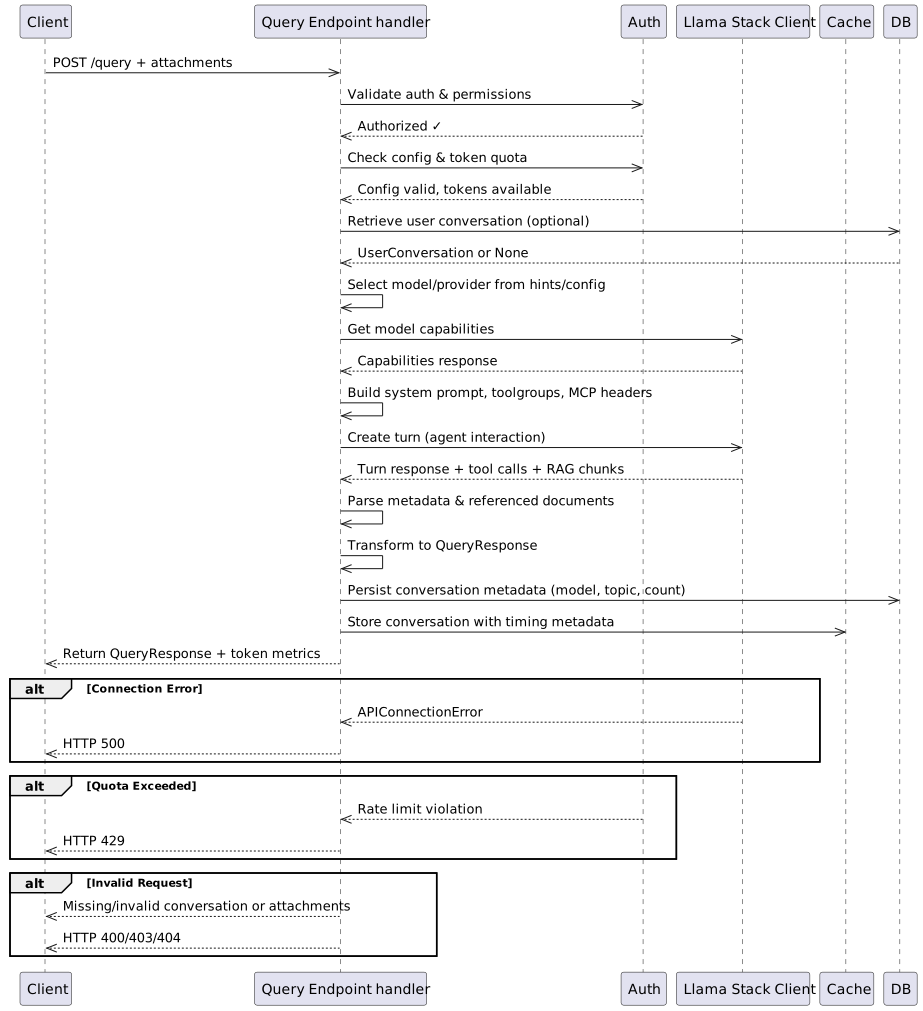
Table of Contents
- Introduction
- Endpoint Overview
- Request Specification
- Response Specification
- Stream Interruption
- Processing Flow
- System Prompt Resolution
- Model and Provider Selection
- Quota and Token Counting
- Error Handling
- Examples
Introduction
The LCORE Query API provides the primary interface for submitting questions to an LLM backend. It supports text and image attachments, inline RAG (file search and Solr), MCP tool execution, safety shield moderation, conversation history, and quota management.
Both endpoints share the same request model (QueryRequest) and processing pipeline, differing only in how the response is delivered:
/v1/queryreturns a single JSON response after the LLM finishes./v1/streaming_queryreturns an SSE stream of incremental events as the LLM generates tokens.
Endpoint Overview
/v1/query |
/v1/streaming_query |
|
|---|---|---|
| Method | POST |
POST |
| Request format | JSON | JSON |
| Response format | JSON | Server-Sent Events (SSE) |
| Content-Type | application/json |
text/event-stream (or text/plain) |
Request Specification
Request Fields
Both endpoints accept a JSON body with the following fields. Unknown fields are rejected with HTTP 422.
| Field | Type | Required | Default | Description |
|---|---|---|---|---|
query |
string | Yes | – | The question to send to the LLM |
conversation_id |
string | No | null |
Conversation ID to continue (UUID, 48-char hex, or conv_-prefixed hex) |
provider |
string | No | null |
Provider identifier (e.g., "openai"). Must be specified with model |
model |
string | No | null |
Model identifier (e.g., "gpt4mini"). Must be specified with provider |
system_prompt |
string | No | null |
Custom system prompt override |
attachments |
array[Attachment] | No | null |
List of text or image attachments |
no_tools |
boolean | No | false |
Skip all tools and MCP servers for this request |
generate_topic_summary |
boolean | No | true |
Generate topic summary for new conversations |
media_type |
string | No | null |
Response format: "application/json" or "text/plain" |
vector_store_ids |
array[string] | No | null |
Restrict RAG to specific vector store IDs |
shield_ids |
array[string] | No | null |
Safety shield IDs to apply (all configured shields if omitted) |
solr |
object | No | null |
Solr inline RAG options (see Solr Vector Search) |
Attachments
Each attachment in the attachments array has three required fields:
| Field | Type | Required | Description |
|---|---|---|---|
attachment_type |
string | Yes | Category of the attachment |
content_type |
string | Yes | MIME type of the content |
content |
string | Yes | The attachment content (raw text or base64-encoded image data) |
Allowed attachment_type values: "alert", "api object", "configuration", "error message", "event", "image", "log", "stack trace"
Allowed content_type values: "text/plain", "application/json", "application/yaml", "application/xml", "image/jpeg", "image/png"
Text attachments (non-image content types) are appended to the query text as contextual information and included in the input sent to the LLM.
Image Attachments
Image attachments (content_type of "image/jpeg" or "image/png") are handled differently from text attachments:
attachment_typemust be"image"whencontent_typeis an image MIME type, and vice versa. Mismatches are rejected with HTTP 422.contentmust be valid base64-encoded image data. Invalid base64 is rejected with HTTP 422.- Decoded image size must not exceed 100 MB (104,857,600 bytes).
- Image attachments are not appended to the query text. Instead, they are passed as structured multimodal input to the LLM, each converted to a data URL (
data:{content_type};base64,{content}).
Solr Vector Search
The optional solr field configures Solr inline RAG behavior:
| Field | Type | Required | Default | Description |
|---|---|---|---|---|
mode |
string | No | "hybrid" (server default) |
Search mode: "semantic", "hybrid", or "lexical" |
filters |
object | No | null |
Solr provider filter payload (structured metadata filters or legacy fq-style) |
Legacy format: A plain filter object without mode or filters keys (e.g., {"fq": ["product:*openshift*"]}) is automatically treated as {"mode": null, "filters": <the object>} for backward compatibility. This format is deprecated.
Validation Rules
queryis required. Missing it returns HTTP 422.providerandmodelmust both be specified or both be omitted. Specifying one without the other returns HTTP 422.conversation_idmust be a valid UUID, 48-character hex string, orconv_-prefixed 48-character hex string. Invalid formats return HTTP 422.media_typemust be exactly"application/json"or"text/plain"if specified.- Image attachment
attachment_typeandcontent_typemust be consistent (both image or both non-image). - Image attachment
contentmust be valid base64 and within the size limit. - Unknown fields in the request body are rejected (
extra="forbid").
Response Specification
Synchronous Response
POST /v1/query returns a JSON object with the following fields:
| Field | Type | Default | Description |
|---|---|---|---|
conversation_id |
string | null |
The conversation ID |
response |
string | – | The LLM-generated response text |
referenced_documents |
array[object] | [] |
Documents referenced during generation |
input_tokens |
integer | 0 |
Tokens sent to the LLM |
output_tokens |
integer | 0 |
Tokens received from the LLM |
available_quotas |
object | {} |
Remaining quota per limiter |
tool_calls |
array[object] | [] |
Tool calls made during generation |
tool_results |
array[object] | [] |
Tool call results |
rag_chunks |
array[object] | [] |
(Deprecated) RAG chunks used |
truncated |
boolean | false |
(Deprecated) Always false |
context_status |
string | "full" |
Whether the conversation context is "full" (complete history) or "summarized" (older turns were summarized via conversation compaction) |
referenced_documents items:
| Field | Type | Description |
|---|---|---|
doc_url |
string | Document URL |
doc_title |
string | Document title |
source |
string | Source identifier |
document_id |
string | Document ID |
tool_calls items:
| Field | Type | Description |
|---|---|---|
id |
string | Tool call ID |
name |
string | Tool or function name |
args |
object | Arguments passed to the tool |
type |
string | Always "tool_call" |
tool_results items:
| Field | Type | Description |
|---|---|---|
id |
string | Tool call ID |
status |
string | Result status (e.g., "success") |
content |
string | Tool output content |
type |
string | Always "tool_result" |
round |
integer | Inference round number |
Streaming Response (SSE)
POST /v1/streaming_query returns an SSE stream. Each event is a line of the form:
data: {"event": "<event_type>", "data": {<payload>}}
Events are separated by double newlines (\n\n).
SSE Event Types
Events are emitted in the following order during a successful stream:
1. start
Emitted first. Provides IDs for tracking.
{"event": "start", "data": {"conversation_id": "<uuid>", "request_id": "<uuid>"}}
The request_id can be used with the interrupt endpoint to cancel the stream.
2. compaction (optional)
Emitted when conversation compaction is triggered before inference.
{"event": "compaction", "data": {"status": "started", "conversation_id": "<uuid>"}}
3. token
Emitted for each text delta from the LLM.
{"event": "token", "data": {"id": 0, "token": "Kubernetes"}}
The id field is a monotonically increasing integer.
4. tool_call
Emitted when a tool call is made.
{"event": "tool_call", "data": {"id": "tc_1", "name": "get_weather", "args": {"city": "Boston"}, "type": "tool_call"}}
5. tool_result
Emitted when a tool call returns.
{"event": "tool_result", "data": {"id": "tc_1", "status": "success", "content": "72F", "type": "tool_result", "round": 1}}
6. turn_complete
Emitted when the full response is assembled.
{"event": "turn_complete", "data": {"id": 5, "token": "<full response text>"}}
7. end
Emitted last on success. Contains metadata including context_status ("full" or "summarized").
{
  "event": "end",
  "data": {
    "referenced_documents": [],
    "truncated": null,
    "input_tokens": 11,
    "output_tokens": 19,
    "context_status": "full"
  },
  "available_quotas": {"UserQuotaLimiter": 998911}
}
error
Emitted if an error occurs mid-stream (after HTTP 200 headers are already sent).
{"event": "error", "data": {"status_code": 413, "response": "Context window exceeded", "cause": "The input exceeds the context window size."}}
interrupted
Emitted when the stream is cancelled via the interrupt endpoint.
{"event": "interrupted", "data": {"request_id": "<uuid>"}}
Plain-Text Streaming Mode
When media_type is "text/plain", the streaming response uses text/plain content type instead of SSE. Events are simplified:
token: Raw token text (no JSON wrapper)tool_call:[Tool Call: <function_name>]\ntool_result:[Tool Result]\nturn_complete: Empty stringend: Referenced documents rendered as\n\n---\n\n<title>: <url>lineserror:Status: <code> - <response> - <cause>
Stream Interruption
Endpoint: POST /v1/streaming_query/interrupt
Cancels an in-progress streaming query.
Request:
| Field | Type | Required | Description |
|---|---|---|---|
request_id |
string | Yes | The request_id from the start SSE event |
Response:
| Field | Type | Description |
|---|---|---|
request_id |
string | The targeted request ID |
interrupted |
boolean | Whether an active stream was interrupted (false if already completed) |
message |
string | Human-readable status message |
When a stream is interrupted, any partial response is persisted to conversation history and token consumption is skipped.
Processing Flow
Both endpoints share the same pre-processing pipeline:
- Verify configuration is loaded (500 if not)
- Authenticate the caller (401 if invalid)
- Check MCP OAuth requirements (401 if MCP server requires OAuth login)
- Check token quota availability (429 if exceeded)
- Validate model/provider override against RBAC (403 if not permitted)
- Validate
shield_idsoverride against configuration - Validate attachment metadata (422 if invalid
attachment_typeorcontent_type) - Retrieve existing conversation if
conversation_idis provided (404 if not found, 403 if not owned) - Run shield moderation on user input (query + text attachments)
- Build inline RAG context from vector stores (BYOK + Solr)
- Prepare Responses API parameters (model, system prompt, tools, MCP headers)
- Extract image attachments separately for multimodal input construction
/v1/query then: applies conversation compaction (blocking), calls the LLM, generates topic summary, consumes tokens, stores results, returns JSON. When compaction is applied, the response includes context_status: "summarized"; otherwise context_status: "full".
/v1/streaming_query then: generates a request_id, starts the SSE stream, applies compaction if needed (emitting a compaction SSE event), emits events as the LLM generates tokens, performs post-stream cleanup (topic summary, token consumption, persistence). The end event includes context_status indicating whether compaction was applied.
System Prompt Resolution
The system_prompt field follows server-side resolution with the following precedence (highest to lowest):
- Client-provided
system_prompt– Used as-is if per-request customization is allowed - Custom profile default prompt – If a custom profile is configured with a
"default"prompt - Configured system prompt – From
customization.system_promptin the server configuration - Built-in default –
"You are a helpful assistant"
If the server configuration sets disable_query_system_prompt to true, requests with a non-null system_prompt are rejected with HTTP 422.
Model and Provider Selection
modelandprovidermust both be specified or both be omitted- When specified, the caller must have the
model_overrideRBAC permission (403 if not) - When omitted, the server uses the default configured model
- Internally, the model ID is formatted as
"provider/model"for the Responses API
Quota and Token Counting
- Pre-request:
check_tokens_available()verifies the user/cluster has available quota (429 if not) - Post-response:
consume_query_tokens()deductsinput_tokensandoutput_tokensfrom configured quota limiters - Available quotas: Remaining balances per limiter are included in the response (
available_quotasfield in sync,endevent in streaming) - Stream interruption: Token consumption is skipped for interrupted streams
Error Handling
| Status Code | When It Occurs |
|---|---|
| 401 | Missing or invalid credentials |
| 403 | Insufficient permissions (endpoint access, conversation access, model override) |
| 404 | Conversation, model, or provider not found |
| 413 | Input exceeds the model’s context window size |
| 422 | Request validation failed (missing fields, invalid formats, attachment errors) |
| 429 | Token quota exceeded |
| 500 | Configuration not loaded, unexpected server errors |
| 503 | Cannot connect to OGX backend |
For streaming, errors that occur after HTTP 200 headers are sent are delivered as SSE error events within the stream.
Examples
Basic Query
curl -X POST http://localhost:8090/v1/query \
  -H "Content-Type: application/json" \
  -H "Authorization: Bearer $TOKEN" \
  -d '{
    "query": "What is Kubernetes?",
    "model": "gpt4mini",
    "provider": "openai"
  }'
Response:
{
  "conversation_id": "123e4567-e89b-12d3-a456-426614174000",
  "response": "Kubernetes is an open-source container orchestration platform...",
  "referenced_documents": [],
  "input_tokens": 42,
  "output_tokens": 128,
  "available_quotas": {"UserQuotaLimiter": 998830},
  "tool_calls": [],
  "tool_results": [],
  "rag_chunks": [],
  "truncated": false,
  "context_status": "full"
}
Query with Attachments
curl -X POST http://localhost:8090/v1/query \
  -H "Content-Type: application/json" \
  -H "Authorization: Bearer $TOKEN" \
  -d '{
    "query": "What does this log indicate?",
    "attachments": [
      {
        "attachment_type": "log",
        "content_type": "text/plain",
        "content": "ERROR 2024-01-15 OOMKilled: container exceeded memory limit"
      }
    ]
  }'
Query with Image Attachment
curl -X POST http://localhost:8090/v1/query \
  -H "Content-Type: application/json" \
  -H "Authorization: Bearer $TOKEN" \
  -d '{
    "query": "Describe what you see in this image",
    "attachments": [
      {
        "attachment_type": "image",
        "content_type": "image/png",
        "content": "iVBORw0KGgoAAAANSUhEUgAAAAEAAAABCAIAAACQd1PeAAAADElEQVR4nGP4z8AAAAMBAQDJ/pLvAAAAAElFTkSuQmCC"
      }
    ]
  }'
Image attachments can be combined with text attachments in the same request:
curl -X POST http://localhost:8090/v1/query \
  -H "Content-Type: application/json" \
  -H "Authorization: Bearer $TOKEN" \
  -d '{
    "query": "Analyze this error and the related screenshot",
    "attachments": [
      {
        "attachment_type": "log",
        "content_type": "text/plain",
        "content": "FATAL: connection refused on port 5432"
      },
      {
        "attachment_type": "image",
        "content_type": "image/png",
        "content": "<base64-encoded-image-data>"
      }
    ]
  }'
Streaming Query
curl -X POST http://localhost:8090/v1/streaming_query \
  -H "Content-Type: application/json" \
  -H "Authorization: Bearer $TOKEN" \
  -d '{
    "query": "Explain Kubernetes architecture",
    "model": "gpt4mini",
    "provider": "openai"
  }'
Streaming Response (SSE):
data: {"event": "start", "data": {"conversation_id": "abc123", "request_id": "req-456"}}

data: {"event": "token", "data": {"id": 0, "token": "Kubernetes"}}

data: {"event": "token", "data": {"id": 1, "token": " is"}}

data: {"event": "token", "data": {"id": 2, "token": " an"}}

...

data: {"event": "turn_complete", "data": {"id": 50, "token": "Kubernetes is an open-source..."}}

data: {"event": "end", "data": {"referenced_documents": [], "truncated": null, "input_tokens": 11, "output_tokens": 50, "context_status": "full"}, "available_quotas": {"UserQuotaLimiter": 998950}}
Streaming Query Interrupt
curl -X POST http://localhost:8090/v1/streaming_query/interrupt \
  -H "Content-Type: application/json" \
  -H "Authorization: Bearer $TOKEN" \
  -d '{
    "request_id": "req-456"
  }'
Response:
{
  "request_id": "req-456",
  "interrupted": true,
  "message": "Stream interrupted successfully"
}